Spot Students with Active Prescription from profile
Demo:
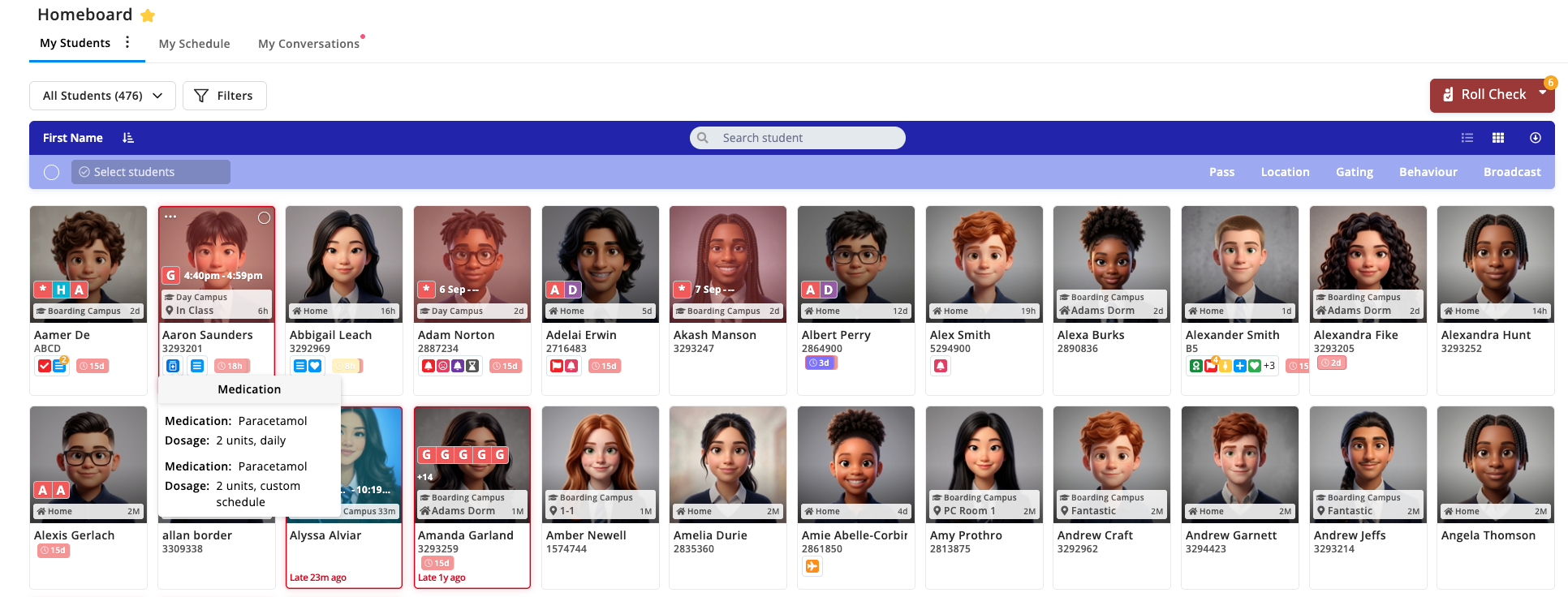
The Snapshot
You can now see at a glance which students have an active prescription. A medication icon appears right next to the watch list icon, on both the Home Board and each student's profile — no need to open the Medications module to check.
What's New
Hover over the icon on desktop, or tap it on mobile, to see the medication name and dosage for every active prescription. On Student Profile, the watch list icon now gets the same hover behaviour as the Home Board. Visibility follows your existing Admin Console permissions — if a role doesn't have Medications access, that icon and its details stay completely hidden for them.
Why It Matters
House parents and medical staff no longer need to dig into the Medications module to check who's on medication before an outing, a meal, or a check-in. It's the same quick-glance pattern staff already trust for the watch list, so there's nothing new to learn — and because it follows the permissions you've already set up, medical details are only visible to staff who are meant to see them.
Next Steps
Open the Home Board or a student's profile
Look for the medication icon next to the watch list icon — it only appears for students with an active prescription
Hover over the icon on desktop, or tap it on mobile, to see the medication name and dosage
On mobile, tap the X or tap outside the pop-up to dismiss it
Questions about medication permissions? Reach out to your CSM.
View the roadmap here: https://orah.featurebase.app/p/medication-manager-icons